

“Minecraft Gamerules” Although there are many options available to players in Minecraft, the default settings may not always suit your preferences. This is where gamerules for Minecraft come in handy. You can alter your world’s functionality with these secret options without installing mods or altering game files.
I began utilizing gamerules when testing builds and building survival worlds because they made it easier for me to manage minor issues that would otherwise become bothersome, such as dealing with unwelcome mob damage or losing stuff after death. Gamerules in Minecraft are straightforward commands that manage many aspects of the game.
In addition to many other world settings, you may alter the way the weather behaves, prevent monsters from breaking blocks, preserve your belongings when you die, and freeze time. These instructions can improve your gameplay whether you administer a multiplayer server, play survival, or play creative.
Because they believe commands are reserved for more experienced players, many novice players disregard gamerules. That is untrue. They become one of the simplest ways to personalize your Minecraft experience once you figure out how they operate.
Minecraft Gamerules – What Are They?
Minecraft gamerules are specific settings that can be used to govern certain behaviors of your Minecraft world. These options are implemented using the /gamerule command and enable users to modify the behavior of specific game systems. Game rules don’t introduce new blocks, items, or features to Minecraft. Instead, they just tweak the current mechanics and give users more choice over their gameplay experience.
For example, the maintain inventory gamerule modifies what happens when a player dies. Usually, when people die in Minecraft, their items drop to the ground and have to be picked up. Rather than losing items, players can safely store them in their inventory with the proper game rule. You can also visit the Minecraft Wiki – Game Rule page to see a complete list of available gamerules and how each one works.
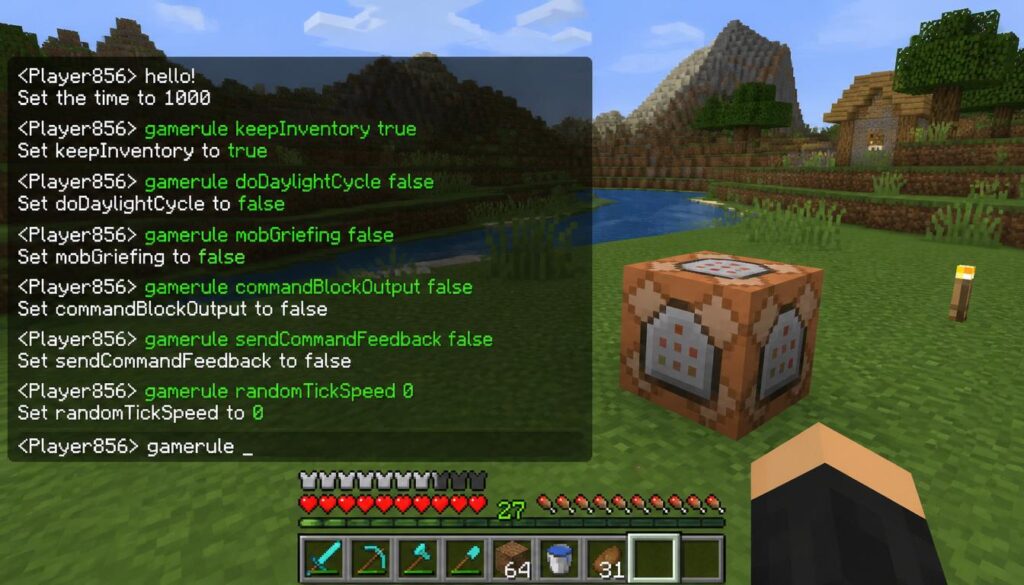
The basic format for a gamerule command is simple:/gamerule rule_name [value]. The rule name tells you the setting you want to change, and the value tells Minecraft what to do. Most game rules have a boolean value. “True” means the feature is enabled; “false” means it is disabled.
For instance:/gamerule keepInventory on“This command allows players to keep their items on death. Game rules have been quite helpful to me in my massive Minecraft constructions. Losing uncommon blocks, equipment, or valuable things while testing can be a huge time sink. A minor tweak to the parameters can make the whole building process easier and more fun.”
How to Enable and Disable Minecraft Gamerule Commands
Using gamerule commands in Minecraft is easy, but users will need to have permission to use commands first. When building a new single-player world, you can turn cheats on in the world settings. If you already have a planet, you can open it to LAN and enable cheats. Once the commands are enabled, open the chat window and type in the gamerule command you want to use. These changes will be applied immediately in your Minecraft world.
For instance:/gamerule keepInventory on
Players can also list available game rules by typing the following:/gamerule
Minecraft will show you different options based on whatever version you are playing. It’s best to update one gamerule at a time. Changing a whole bunch of parameters at the same time can make it hard to tell which option affected your gameplay. You can try each separately and see what works best for your world.
Top Minecraft Rules
Every Player Must Know: Minecraft features many distinct gamerules, but some are more popular than others since they solve typical problems players have while surviving, building, and exploring. These options are popular because they provide you more control without affecting the basic Minecraft experience.

Gamerule Keep Inventory
One of the most frequent commands in Minecraft is the gamerule keep inventory. Many players spend hours acquiring rare goods, armor, equipment, and precious resources. A sudden death can be frustrating and can hold down development when all is lost. Players can use the keep inventory option to retain their items upon death.
Especially valuable to newbies that are still learning survival mechanics. It’s also useful when exploring perilous regions like the Nether or Ancient Cities, where it can be tricky to get lost goods back. More experienced players might want to turn this feature off, because they appreciate the challenge of finding their missing things. Other players make it possible since they wish to create / explore more. Both ways of playing are perfectly valid.
Gamerule mobGriefing explained
Mob Griefing Gamerule This gamerule determines if particular mobs are allowed to change or destroy the environment. This option is quite handy for players who spend a lot of time developing massive structures. Certain mobs cannot normally interact with blocks while mob griefing is deactivated. Creepers cannot blow up buildings, endermen cannot take up blocks, and ghasts cannot shoot fireballs to damage structures.
This setting is typically used by builders, because a single creeper explosion can wipe out hours of effort. However, players must keep in mind that deactivating mob griefing will also affect villages. Some agricultural systems might not function well because villagers are unable to interact with crops in the same way.
Changing Time using the Daylight Cycle
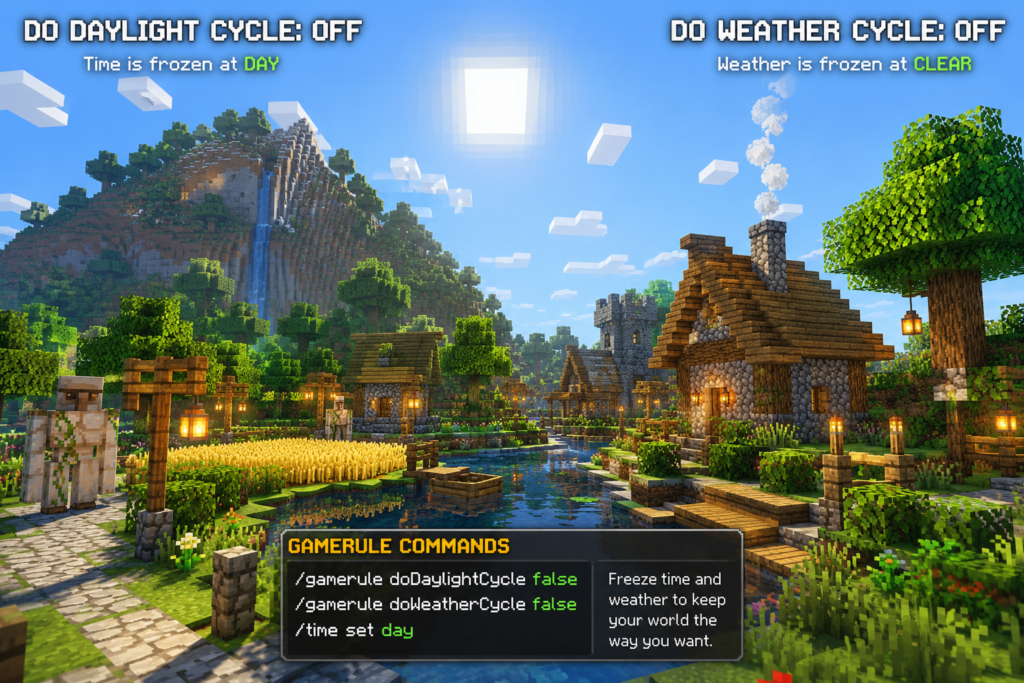
The day/night cycle is a crucial aspect of Minecraft. Some players like the natural time fluctuations, while others choose to have a set time when developing projects or making videos. The doDaylightCycle gamerule dictates whether or not time moves forward in Minecraft. A deactivated setting locks the current time in.
Many creative builders utilize this instruction, as even lighting can help complete massive structures. It is also used by map makers for making bespoke experiences. Players can turn the setting back on if they want to get the typical day and night cycle again. The day and night cycle in Minecraft will still occur as normal. Simulation Distance in Minecraft

Weather Manipulation with doWeatherCycle
Weather can alter the feel of a Minecraft world. Rain can seem good at times, but it can be frustrating when you’re creating, shooting films, or capturing screenshots. Weather changes are controlled by the doWeatherCycle gamerule. If you turn this off, Minecraft won’t change the weather automatically. Players have the ability to manually clear the weather if needed. Many builders and content developers like clear weather as it makes managing worlds easier and visibility better.
Gamerules Practical Survival Players
Many players think game rules are only important in creative mode; however, even survival gamers can benefit from them. This kind of configuration can make the survival gameplay more fluid while still being fun. For example, the fire damage gamerule can be used to prohibit players from getting damage from fire. This can help when testing designs or working near lava zones.
Another handy option is to change the random tick speed. This setting affects natural updates such as crop growth, leaf decay, and plant modifications. These settings should be used carefully, as very high values may cause performance problems. Changing too many game rules can also remove some of the challenges that make the survival mode fun.
Final Thoughts
Minecraft gamerules provide users greater control over their worlds and allow them to customize their gameplay experience. These options can help you save time and make the game more fun while you are building large constructions, visiting dangerous places, mapping, or developing your survival planet.
Commands such as keepInventory, mobGriefing, doDaylightCycle, and doWeatherCycle are among the most useful gamerules that all players should be aware of. Game rules are great because they allow the players to build a world that fits their own playstyle. Some people want a hard survival experience; others want a chill creative setting. With the correct game rules, Minecraft can become exactly the experience each player needs.
Faqs
Which Minecraft gamerule is the most beneficial?
Because it keeps players from losing stuff after dying, the keep inventory rule is among the most beneficial.
How can I view every gamerule in Minecraft?
To view the available gamerule settings in your version, type “/gamerule” into the chat box.
Do gamerules function in the survival mode of Minecraft?
As long as you have authorization to use commands, gamerules do indeed function in survival worlds.
Can I disable gamerules once I’ve enabled them?
Yes, you may reverse the majority of game rules by using the opposite value, like turning true to false.
Are gamerules for all versions of Minecraft available?
Most game rules are available in Java and Bedrock editions; however, some names and options may differ between versions.
Gamerules for Minecraft are an easy method to manage your world without altering the main game. You’ll see how much simpler it is to create the kind of Minecraft experience you truly like once you start using them. A few minor options can alter how you play, whether you’re building, exploring, or managing a server.